How-to: Using the OCR webservice of webPDF 7
Minimum technical requirements
- Java version: 7
- webPDF version: 7
- wsclient version: 1

This example explains how to use the OCR webservice of webPDF. OCR in webPDF is based on Tesseract. By default, German, English, French, Spanish, and Italian are supported. Additional languages can be installed in the Tesseract folder (see the webPDF manual for details).
Languages using a multibyte character set are currently not supported, for example Arabic and several Far Eastern languages. OCR is mainly useful for documents that contain text visually, but not as embedded searchable text. For extracting already embedded text from PDF documents, webPDF provides an option in the Toolbox webservice.
Create the project and generate the required proxy classes
Create a Java project in IntelliJ with the same approach as in this previous article: How to use the webservices of webPDF 7.
Use these project options:
- Template:
Command Line App - Project name:
OCRExample - Project location:
..\\OCRExample - Base package:
net.webpdf
Open the project view in IntelliJ. In the src folder, open a command prompt and generate the proxy classes with:
wsimport -Xnocompile -s . http://localhost:8080/webPDF/soap/ocr?wsdl -extension
As in previous examples, create a Main class with a main method.
The project is now ready and the proxy classes are generated.
Using the OCR webservice
As in previous tutorials, insert the full code into the main method of class Main.
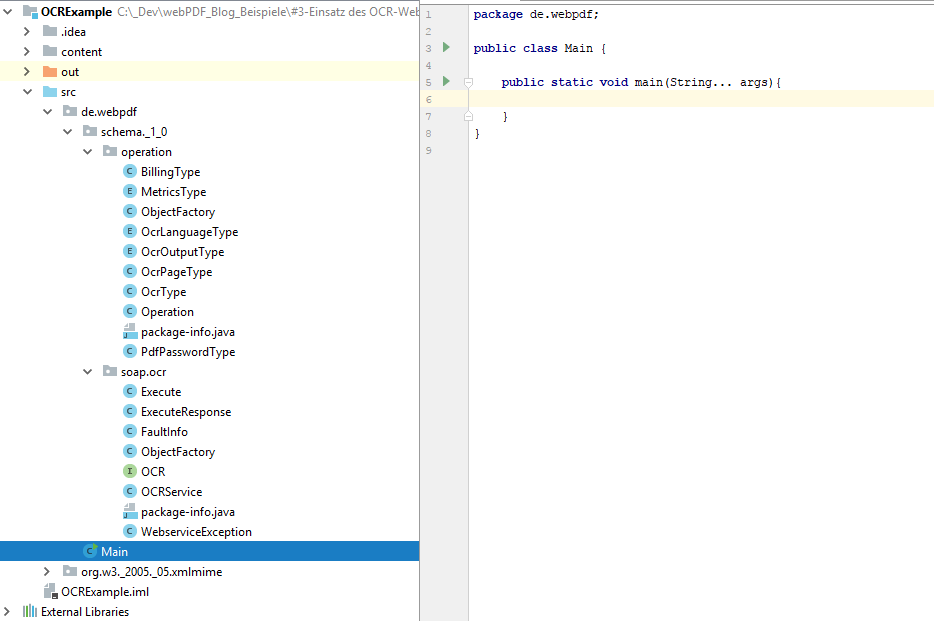
Before that, create a folder named content and add the sample files TIFFimgContent.tiff and webPDFContent.pdf (see attachment section).
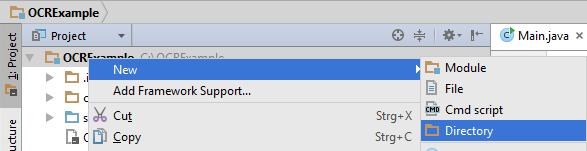
Create the new content folder.

Project with populated content folder.
Now start implementing the code in the main method.
File pdfFile = new File("./content/webPDFContent.pdf");
File tiffFile = new File("./content/TIFFimgContent.tiff");

URL ocrUrl;
try {
  // initialize URL
} catch (MalformedURLException ex) {
  // error handling
}
First, two File objects are created for the files in the content folder. Then, as in previous tutorials, the URL for creating the service instance is defined.
Operation ocrStrictTextOperation = new Operation();
ocrStrictTextOperation.setOcr(new OcrType());
ocrStrictTextOperation.getOcr().setLanguage(OcrLanguageType.DEU);
ocrStrictTextOperation.getOcr().setOutputFormat(OcrOutputType.TEXT);

Operation ocrTolerantTextOperation = new Operation();
ocrTolerantTextOperation.setOcr(new OcrType());
ocrTolerantTextOperation.getOcr().setLanguage(OcrLanguageType.DEU);
ocrTolerantTextOperation.getOcr().setOutputFormat(OcrOutputType.TEXT);
// Process files even if resolution is below 200 dpi
ocrTolerantTextOperation.getOcr().setCheckResolution(false);

Operation ocrHocrOperation = new Operation();
ocrHocrOperation.setOcr(new OcrType());
ocrHocrOperation.getOcr().setLanguage(OcrLanguageType.DEU);
ocrHocrOperation.getOcr().setOutputFormat(OcrOutputType.HOCR);

Operation ocrPdfOperation = new Operation();
ocrPdfOperation.setOcr(new OcrType());
ocrPdfOperation.getOcr().setLanguage(OcrLanguageType.DEU);
ocrPdfOperation.getOcr().setOutputFormat(OcrOutputType.PDF);
ocrPdfOperation.getOcr().setCheckResolution(false);
This creates four different Operation instances. The webservice-specific operation concept was introduced in the previous tutorial.
All instances use German as OCR language (OcrLanguageType.DEU). Two instances use text output (OcrOutputType.TEXT), one uses XHTML in hOCR format (OcrOutputType.HOCR), and one uses PDF output (OcrOutputType.PDF). Two instances disable the 200 dpi minimum resolution check (setCheckResolution(false)), while the other two keep the default (true).
Parameters are documented in the webPDF manual.
OCRService ocrService = new OCRService(ocrUrl);
OCR ocr = ocrService.getOCRPort();

StringBuilder pdfTextResult = new StringBuilder("Text extracted from a PDF:\n");
StringBuilder imgTextResult = new StringBuilder("Text extracted from a TIFF image:\n");

try {
  // OCR calls and result handling
  ocrHandler = ocr.execute(ocrTolerantTextOperation, null, tiffFile.toURI().toURL().toString());
  textScanner = new Scanner(ocrHandler.getInputStream());
  while (textScanner.hasNextLine()) {
    // collect text output
  }

  ocrHandler = ocr.execute(ocrHocrOperation, new DataHandler(new FileDataSource(pdfFile)), null);
  ocrHandler.writeTo(new FileOutputStream(new File("./hOCRResult.xhtml")));

  ocrHandler = ocr.execute(ocrPdfOperation, null, tiffFile.toURI().toURL().toString());
  ocrHandler.writeTo(new FileOutputStream(new File("./PDFResult.pdf")));
} catch (WebserviceException | IOException e) {
  // error handling
}

System.out.println(pdfTextResult.toString());
System.out.println("-----------------------------------------\n");
System.out.println(imgTextResult.toString());
In this part, the service and endpoint objects are initialized first. Then four requests are sent to the OCR webservice.
Each response is temporarily stored in ocrHandler as a DataHandler. The first two requests return text data, which is read via Scanner and appended to the corresponding StringBuilder. The third request returns an hOCR XHTML file, and the fourth returns a PDF file. Both are saved directly in the project directory.
At the end, extracted text from the PDF and TIFF files is printed.

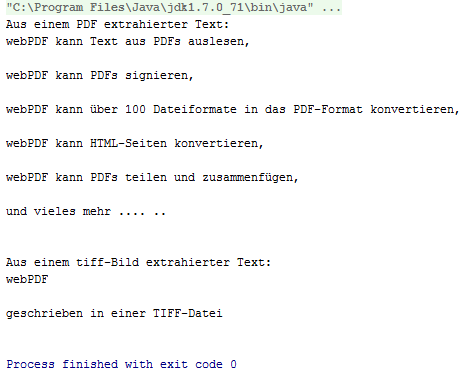

With the OCR webservice, you extracted non-embedded text from a PDF and a TIFF file, generated a PDF from OCR analysis of a TIFF file, and generated an XHTML file in hOCR format from OCR analysis of a PDF file.
Congratulations!
Attachment
Required imports for the class:
import de.webpdf.schema._1_0.operation.OcrLanguageType;
import de.webpdf.schema._1_0.operation.OcrOutputType;
import de.webpdf.schema._1_0.operation.OcrType;
import de.webpdf.schema._1_0.operation.Operation;
import de.webpdf.schema._1_0.soap.ocr.OCR;
import de.webpdf.schema._1_0.soap.ocr.OCRService;
import de.webpdf.schema._1_0.soap.ocr.WebserviceException;
import javax.activation.DataHandler;
import javax.activation.FileDataSource;
import java.io.File;
import java.io.FileOutputStream;
import java.io.IOException;
import java.net.MalformedURLException;
import java.net.URL;
import java.util.Scanner;